Kubernetes - Update
A little update of my Kubernetes cluster, after forgetting this blog for a while.

I'll admit it : I'm not the best at keeping a blog. I got carried in the events of life, and completely forgot about the blog at all. But here I am again, ready to expose the current state of my cluster, as well as what I still need to do.
Distribution & Hardware
This point will be quick : I use k3s. K3s is easy to setup, provides many things by default: perfection.
I did install k3s with secrets encryption at rest (using the --secrets-encryption argument), to have my cluster just a bit more secure. I also disabled Traefik - more on that later !
As for hardware, I currently have the following machines, some with and some without Kubernetes, that constitute my network :
| Name | RAM | CPU | Disk(s) | Kubernetes | Description |
|---|---|---|---|---|---|
| homeserver | 8GB | 4c / 4t | root: 250GB (SD Card) sda1: 1TB (External SSD) |
No | A raspberry pi 5 Runs Raspbian. |
| server3 | 4GB | 2c / 2t | root: 500GB (SSD) | Yes · Control Plane | A lenovo thinkcenter small factor, the head of the cluster. Runs Alpine. |
| server4 | 32GB | 14c / 20t | root: 1TB (SSD) | Yes · Worker | A NUC, the powerhouse of the cluster. Runs Debian. |
| vps1 | 12GB | 6c / 6t | root: 100GB | Yes · Worker | An OVH vps, the entrypoint of the cluster. Runs Debian. |
| NAS-Backup1 | 6GB | / | root: 250GB (SSD) sda1: 1TB (External SSD) |
No | A lenovo laptop, converted to a ""NAS"", to backup everything. Runs Alpine. |
Everything, except for vps1, runs in my house. It is isolated from the rest of my home network thanks to a VLAN. There are two main entry points for my cluster :
- vps1 for everything public, aka exposed to the internet
- server4 for everything private, aka only available from my home network
Vps1 is connect to the rest of the machines via a Wireguard tunnel.
System Utilities
So what exactly makes everything run together ? I have multiple "system utilities" for my cluster to work the way I want.
Flux & GitOps
Flux is a way to maintain your cluster at a desired state, expressed by yaml files. It allows a GitOps flow, where changes to your cluster are made by pushing changing to a git repository. I chose to use it for multiple reasons. First of all, because I can have an overview of my cluster just by looking at files. That's a thing I love, and that I think is very important to have. Just by looking at a directory on my computer, I can know what pods I have running, what version, what parameters... (granted everything went fine of course). It also allows for much cleaner interactions with your cluster. Now, instead of doing commands and then forgetting about them, I can just look at my files and my git history to know exactly what I did. Although this is not my case, I can easily imagine collaboration being MUCH easier with a tool such as Flux.
Longhorn
Once my cluster is up on a git repository (beware, READMEs may not be up to date !), I need a system that will manage volumes for each of my applications. For me, the choice was Longhorn : it uses the machine's storage as a source for volumes. With that, no need for a subscription to an S3 service or a dedicated machine : I can just use the machine itself ! Longhorn also comes with a replica system, allowing for better data availability and integrity. Although, in my case, I only have server4 used as a storage source. I refused to use vps1 as a storage source, because the vps has very few space available, and then I also do not use server3 to not overload it (it's already not doing that great). But maybe in a not so distant future would I be able to have more machines, and thus use the replicas feature ?
I also have backups setup with Longhorn. They all go to an nfs share on NAS-Backup1, where it is stored and ready to be used in a case of emergency. I have restored backups several times already, so I can confirm the system does work, even though it's not very easy to use. As friends once said to me : "It isn't a backup system if you haven't tested it". Well then, I can officially say this is a backup system !
Istio
Having apps running is cool, but what's even cooler is to be able to access them on your browser - for example reading this blog ! For that, I use Istio. Istio is very powerful, and as I stand right now, I am far from utilizing all its features. It allows to do service mesh (I tried to set it up but failed), but then it also act as any Gateway provider. I define a gateway, link HTTPRoutes to it, and boom, my service is available on the web. I have, for now, two Gateways :
- A public Gateway, for apps that are exposed to the web - like this one ;
- A private Gateway, for apps that are not
As you can guess from the words I used, I went with the Kubernetes Gateway API, instead of the soon-deprecated Ingress.
So, why Istio and not the included Traefik ? Well, to be honest, two reasons. First, because a service mesh seems cool. Secondly, and the actual true (and shameful) reason: because I thought a misconfiguration on my part was a Traefik problem, and then I never bothered to go back to Traefik. Istio is cool, it has all the features I want, and so I stuck with it.
Other
There are some other system utilities, that I'll quickly go over :
- Database Operators, for PostgreSQL and MariaDB
- Cert-manager, to automatically request and renew certificates (with DNS-01 challenge)
- Automatic upgrader from rancher, included in k3s, to set my kubernetes version through Flux too.
All the details can be found here by looking at the direct files !
Apps
So, with all of that out of our way, now comes the funny part : what apps do I host on Kubernetes ? The first answer to give is : none of what's expected from Kubernetes. I do not run micro-services application, I run regular docker containers, applications that previously ran with docker compose. That went fine, but that wasn't as funny as k8s, was it ? Before judging what I host, keep in mind I do all of that to learn, and because I like it !
Authentik
One of the center pieces of all my setup is Authentik. As much as possible, I tried to have Authentik be the only point of authentication. Now, Authentik is cool because it has many functionalities that, for quite a small setup such as mine, make it much easier to manage. Namely : it has it's own integrated LDAP server, ie what I can access by OIDC I also can via LDAP. It also has an integrated reverse proxy feature (to protect apps that do not support OIDC, or straight up have no authentication system).
To set it up, I used the helm chart made available by Authentik itself. Then, it is exposed through the public gateway - some apps will be exposed publicly and use Authentik, so I do need to expose it unfortunately.
My personal website
Very small is my personal website. This is a completely different adventure I may write about at some point on this blog. My personal website, of course, is exposed to the internet, so it is on the public gateway.
BentoPDF
BentoPDF is a lightweight PDF utility. You can do lots of things with it, and it stays on your computer as it is local-only operations. There is, to be honest, no reason to self-host BentoPDF as the website already has everything you need. But it's fun ! It is available only through the local network, with the private gateway. I did not add an authentication wall to that app, as there is no real reason to (it is only available on the local network + there is no sensitive data or anything).
Beszel
Now Beszel is really interesting, as it allows for easy monitoring. Nothing fancy like grafana, but it is lightweight and perfect to have an overview of your stack. For example, at the time of writing, this is the state of all my machines :
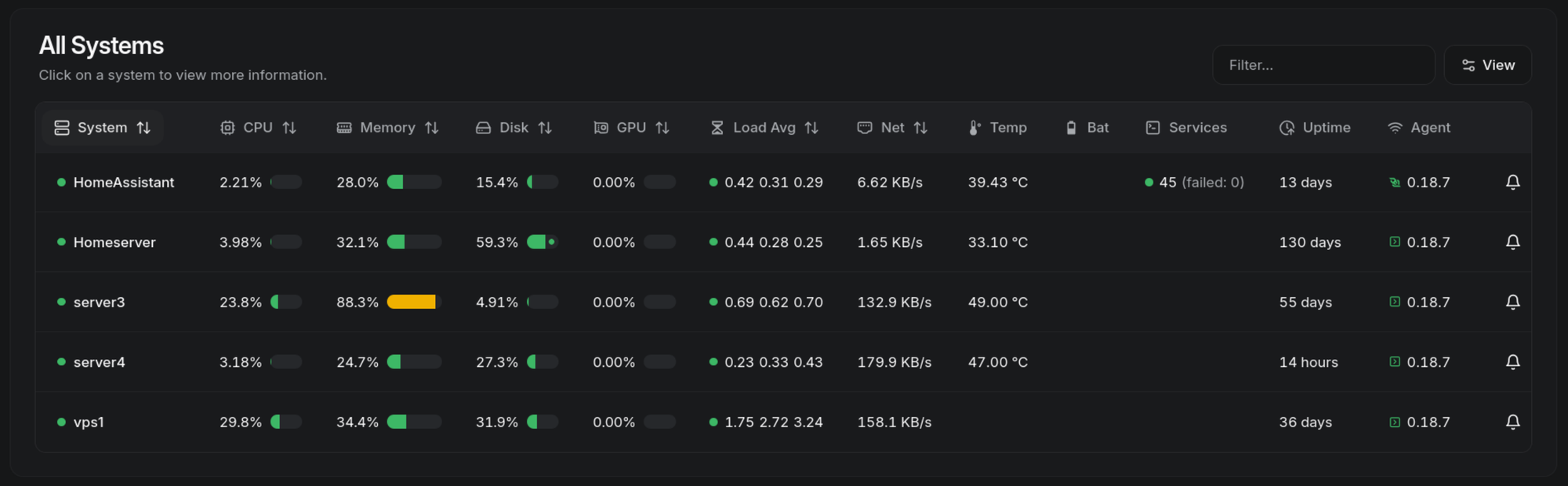
Beszel is just a container to spin up (or a DaemonSet in k8s), and it has all the most important information you need to know. This is only available on the local network, so private gateway. Authentification is done with OIDC to authentik.
BookStack
This one is a wiki. As my setup grows, and people (my family) start using it, I need some sort of documentation to explain the use of all that's available. For that, I chose BookStack. I especially like BookStack for the way it is organized : like an actual bookshelf! You have shelves, on those shelves you have books, in each book you have chapters and in those chapters you have pages. It can connect with OIDC to Authentik, as well as sync groups, it has a WYGIWYS editor, an integration with draw.io to make diagrams, can host pictures, videos... It's perfect !
Now, I'll be honest : I don't fill it nearly enough. But it is definitely on my to-do list to start writing.
This is, of course, a local-only app so private gateway.
Chhoto
Chhoto is a url-shortner made in rust. It's lightweight, it's fast, it does not have a lot of features, but it has everything you need. Just create a short url. That's it.
Now accessing chhoto is a bit different, as the administration pages are only available locally (private gateway), but the redirection links are, of course, exposed to the internet, so public gateway.
ConvertX
Ever needed to convert a file ? You type "x to y converter" in the search bar, end up on a website like Convertio and then just send your data to some unknown location where anyone could be lurking at your file. Well, no more ! ConvertX is a web interface for many, many conversion tools. Just put your file, select the format you want to convert it to, and stay at ease knowing your files never leave your network.
ConvertX is accessed through the private gateway. As it is local, I decided not to have any authentication screen in front of it, but if you decide to expose it to the internet for some reason, keep in mind that anyone could just spam video conversion and that would make your server not very happy.
Forgejo
Forgejo is a git forge. If you know Codeberg : they use a branded Forgejo. It has pretty much everything you would need from a git forge (repositories (of course), issues, pull requests, projets, releases, and even actions if you setup a runner). It's free, open-source, it's perfect.
Now, that one is not on Kubernetes, for multiple reason. The first one is laziness. It was on homeserver before, on docker compose, and I never bothered to transfer it. At the same time, I have thought about this a lot, and concluded that maybe Forgejo on Kubernetes wasn't the best idea, considering that I use Forgejo as the source of truth for the state of my cluster. Overall, there is no real reason for me to change anything, so I don't.
Forgejo is exposed publicly, with a TCP tunnel (through Kubernetes) for ssh usage.
Ghost
This is what you are reading those words on. Ghost is a blog manager. I chose it because it seems interesting and because it allows me to no bother about style. And so far, I've been pretty happy with it !
Just like Chhoto, ghost's admin interface is only available locally while the public part is, well, public.
Mealie
Mealie is a cooking recipe app. I won't say much about it because I have yet to actually use it, but I was able to make it use OIDC with authentik. Exposed through the private gateway.
Nextcloud
Nextcloud is big. It's a cloud storage service, with a calendar, a address book, and many features I don't actually use. My main use of Nextcloud is as some sort of sync service across my two computer, with many documents on it. I also use the calendar. Nextcloud isn't on Kubernetes, it stayed on homeserver, being the AIO version. Nextcloud is publicly available, so public gateway (so that I can sync from wherever).
Paperless-ngx
Paperwork. So much paperwork. Thankfully, Paperless-ngx should make my life easier by having all my paper online, easily searchable, with tags and OCR to make it even better. I have yet to use paperless in an extensive way (I'm waiting to have a good scanner for that), but I hope it makes things easier ! Accessible through the private gateway.
Minecraft
Using itzg images, I host a little minecraft server to play with friends. That one does not use gateways.
To-do
So I have a lot of apps on my cluster. That's cool and all, but what is there left to do ? I actually have plans for multiple things :
- Very important, a security overhaul. I installed kubescape, which allows me to generate a security report of my cluster. That way, I can fix the various problems it will detect and reinforce the general security of my cluster. I'll probably make a blog post about that !
- Some security tweaks in how I access applications, mainly by making authentik's and nextcloud's admin interfaces only accessible from the local network.
- Setup Grafana and logging. Beszel is really good to have an overview of what's going on in term of hardware use, but that's as far as it goes. I probably want Grafana to see in more details what's going on, and maybe help catch some security issues there too !
I don't exactly know where all of that will take me, I have two month to play around with my cluster before starting quite a complicated year... so I'll see !
Hoping that I won't forget to make other blog posts, see ya!